
Pilot's Guide





190-009663-03 Rev. A
Garmin G1000 Pilot’s Guide for the Beechcraft C90A/GT/GTi
129
AUDIO PANEL AND CNS
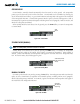
GROUND MODE
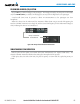
Ground Mode is normally selected automatically when the aircraft is on the ground. The transponder
powers up in the last mode it was in when shut down. Ground Mode can be overridden by selecting any
one of the Mode Selection Softkeys. A green GND indication and transponder code appear in the mode field
of the Transponder Data Box. Ground Mode generates Mode S replies to discrete interrogations as well as
transmission of acquisition and extended squitters including ADS-B out (if equipped). Mode A, Mode C, and
Mode S all-call replies are inhibited.
When Standby Mode has been selected on the ground, press the GND Softkey to return the transponder
to Ground Mode.
GND
Mode
Figure 4-31 Ground Mode
STANDBY MODE (MANUAL)
NOTE: In Standby Mode, the IDENT function is inhibited.
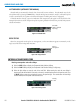
Standby Mode can be selected at any time by pressing the
STBY
Softkey. In Standby, the transponder
is powered and new codes can be entered, but no replies or squitters are transmitted.. When Standby is
selected, a white
STBY
indication and transponder code appear in the mode field of the Transponder Data
Box. In all other modes, these fields appear in green.
STBY Mode (White
Code Number and
Mode)
Figure 4-32 Standby Mode
MANUAL ON MODE
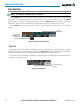
ON Mode can be selected at any time by pressing the ON Softkey. ON Mode generates Mode A and Mode S
replies as well as transmission of acquisition and extended squitters, including ADS-B out (if equipped).
Mode C altitude reporting is inhibited. In ON Mode, a green ON indication and transponder code appear in
the mode field of the Transponder Data Box.
ON Mode
(No Altitude
Reporting)
Figure 4-33 ON Mode