
Pilot's Guide




190-00663-03 Rev. A
Garmin G1000 Pilot’s Guide for the Beechcraft C90A/GT/GTi
128
AUDIO PANEL AND CNS
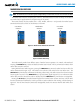
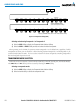
Figure 4-30 Transponder Softkeys (PFD)
Selecting the BACK Softkey
returns to the top-level softkeys.
ALERTS
ALERTS
BACK BKSP
IDENT
7 6 5 4 3 2 1 0
STBY ON
ALT VFR
CODE
IDENT BACK
XPDR
IDENT
Selecting the BACK Softkey returns to the mode selection softkeys.
GND
XPDR1
XPDR2
ADS-B TX
(Optional)
Selecting and activating Transponder 1 or Transponder 2:
1) Select the
XPDR
Softkey to display the Transponder Mode Selection Softkeys.
2) Select the
XPDR1
or
XPDR2
Softkey to select and activate the desired transponder.
When powering on the G1000, the system activates Transponder 1 as the default unit, regardless of which
transponder was active prior to shutdown. When switching between Transponder 1 and Transponder 2, the
code and mode remain the same. If a new code is entered in the active transponder, switching transponders
does not bring back the previous code.
TRANSPONDER MODE SELECTION
Mode selection can be automatic (Ground and Altitude Modes) or manual (Standby, ON, and Altitude Modes).
The
STBY
,
ON,
and
ALT
Softkeys can be accessed by selecting the
XPDR
Softkey.
Selecting a transponder mode:
1) Select the
XPDR
Softkey to display the Transponder Mode Selection Softkeys.
2) Select the desired softkey to activate the transponder mode.