
Pilot's Guide





190-00663-03 Rev. A
Garmin G1000 Pilot’s Guide for the Beechcraft C90A/GT/GTi
110
AUDIO PANEL AND CNS
SELECTING THE RADIO TO BE TUNED
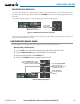
Press the small COM Knob to transfer the frequency selected for tuning and the Frequency Transfer Arrow
between the upper and lower radio frequency fields.
Figure 4-6 Switching COM Tuning Boxes
Press the
COM
Knob to Switch
the Tuning Selection From One
COM Radio to the Other
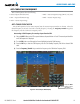
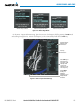
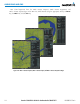
QUICK-TUNING AND ACTIVATING 121.500 MHZ
Pressing and holding the COM
Frequency Transfer
Key for two seconds automatically loads the emergency
COM frequency (121.500 MHz) in the active field of the COM radio selected for tuning (the one with the
transfer arrow). Quick-tuning will operate even if the display portion of the PFD has failed. In the example
shown, pressing the Audio Panel COM2 MIC Key activates the transceiver.
Figure 4-7 Quickly Tuning 121.500 MHz
Press for Two Seconds to
Load 121.500 MHz