
Pilot's Guide




190-00663-03 Rev. A
Garmin G1000 Pilot’s Guide for the Beechcraft C90A/GT/GTi
89
FLIGHT INSTRUMENTS
GRS 7800 DIRECTIONAL GYRO (DG) MODES
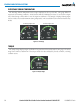
In normal operations, the system operates in DG Slave Mode. In this mode, the displayed heading is slaved
to the heading data provided by the magnetometers, and the heading readout appears in white digits. If the
magnetometer data becomes unreliable or unavailable, such as during operations at extreme latitudes or poles,
the heading readout appears in yellow digits while operating in DG Slave Mode.
DG Free Mode enables the pilot to manually provide heading references to the system. When the pilot
enables DG Free Mode, while the magnetometer data is unreliable or unavailable, the displayed heading readout
appears in cyan, and system follows the heading references entered by the pilot. A ‘FREE’ annunciation appears
next to the heading readout in DG Free Mode. As operation is similar to a conventional directional gyro in this
mode, periodic verification and adjustment is necessary to ensure the displayed heading remains acccurate.
If reliable magnetometer data becomes available while DG Free Mode is enabled, the heading readout appears
in yellow.
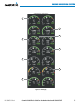
DG Slave Mode with reliable Magnetometer data
DG Slave Mode with unreliable Magnetometer data
DG Free Mode with unreliable Magnetometer data
DG Free Mode with reliable Magnetometer data
Transitioning to DG Slave Mode with reliable
Magnetometer data, alignment in progress
Figure 2-52 DG Mode Annunciations
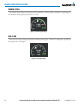
PFD Softkeys control the DG Mode selection, and enable the manual heading reference adjustments while
operating in DG Free Mode. During the transition from DG Free Mode to DG Slave Mode, an align ‘ALN’
annunciation appears next to the displayed heading while the system aligns the displayed heading to the
magnetometer data. Once this alignment is complete, the heading readout returns to white.
Figure 2-53 DG Mode Softkeys