
System Maintenance Manual




Page 5-74 G1000 / GFC 700 System Maintenance Manual - 200/B200 Series King Air
Revision 6 190-00915-01
5.16 GDC 74B Troubleshooting
5.16.1 Air Data Common Problems
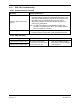
Symptom Recommended Action
Altitude is different than standby
altimeter
• Perform a pitot/static check per Section 7.6 of this manual.
• Determine which instrument is outside limits and replace. The
GDC may be field adjusted per Garmin Service Advisory 0720.
Note: Both units may individually be in spec but show a
difference in altitude. Do not return the GDC to Garmin for
service if not outside limits.
Note: The GDC 74B software for the 200/B200 contains error
correction at 19,000 feet and above. The standby altimeter
does not contain any correction.
GDC Config file does not load.
• Replace GDC config module.
9 If problem persists, replace GDC config module wire harness.
5.16.2 GDC 74B Alerts
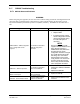
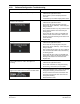
Failure Message Cause Solutions
MANIFEST – GDC1 software
mismatch Communication halted.
The system has detected an
incorrect software version loaded
in the specified GDC 74B.
•
Load correct software version.
See Section 3.9 for the Software
Load Procedure.
MANIFEST – GDC2 software
mismatch Communication halted.