
System Maintenance Manual


Page 7-28 G1000/GFC700 System Maintenance Manual – C90A/C90GT/C90GTi King Air
Revision G 190-00682-01
7.7.2
Procedure A1: GRS 77 Pitch/Roll Offset Calibration
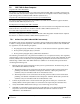
This procedure must be performed for both GRS 77 units installed in the aircraft. This first procedure
must be carried out with the engine off.
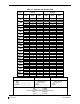
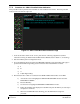
Figure 7-6. GRS 77 Pitch/Roll Offset Calibration Page
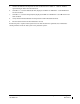
1. Level the aircraft to within ±0.25° of zero pitch and zero roll using a digital level. (Follow
instructions in King Air Model 90 Series Maintenance Manual, listed in Table 1-2, for leveling)
2. Start the G1000 system in Configuration mode.
3. Go to the GRS Page Group and select the GRS/GMU Calibration page at the PFD. This page is
protected and the following softkey password must be entered at the PFD to continue:
a) 9
b) 10
c) 11
d) 12 (Far Right softkey)
4. Ensure that the No. 1 GRS 77 is selected in the SELECT GRS UNIT window on the PFD.
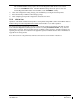
a) Activate the cursor and highlight the SELECT PROCEDURE window and select
PITCH/ROLL OFFSET.
b) Press the ENT key.
c) Use the cursor to highlight the BEFORE CALIBRATION window.
d) Follow the checklist items displayed on the PFD and press the ENT key as each step is
completed or confirmed.
e) When the CALIBRATE field is blinking, press the ENT button to begin the
procedure.