
Owner's Manual


Table Of Contents
- GXM 30 Owner's Manual
- Introduction
- Getting Started
- XM WX Weather Features
- Displaying Weather Information
- NEXRAD Radar
- Satellite Mosaic
- Lightning
- Storm Cells
- Hurricanes
- Surface Winds
- Winds Aloft
- Surface Pressure
- Fronts
- Visibility
- County Warnings
- Water Temperature
- Wave Period
- Wave Direction
- Wave Height
- Marine Warnings
- Buoy Reports
- METAR
- AIRMET
- SIGMET
- TFR
- Echo Tops
- Freezing Level
- Forecast
- TAF
- XM Radio
- Appendix
GXM 30 XM Radio Smart Antenna Owner’s Manual 6
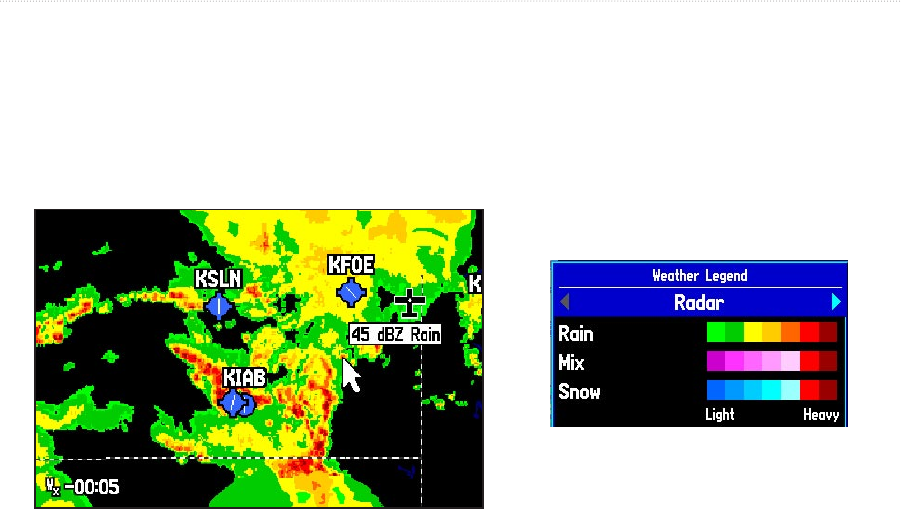
NEXRAD Radar
NEXRAD or NEXt Generation Weather RADar displays precipitation from very light rain and snow up to strong thunderstorms in
varying shades and colors.
In the lower left corner of the screen is a Time Stamp. The Time Stamp displays the elapsed time
since the National Weather Service provided the displayed information. To display a legend showing the colors for Rain, Mix,
and Snow, press
MENU, highlight Weather Legend, and press ENTER. NEXRAD can be displayed independently or with
a variety of other weather information. For information on NEXRAD Limitations, Abnormalities, and Intensity, see pages
30-31.
NEXRAD
NEXRAD Legend
XM WEATHER FEATURES > NEXRAD RADAR