
Instruction Manual
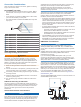
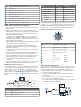
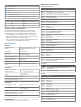
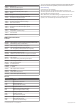
Table Of Contents
- Important Safety Information
- Tools Needed
- Mounting Considerations
- Connection Considerations
- Specifications

Item Description
NMEA 2000 compatible Garmin device
GPS antenna
Ignition or in-line switch
NMEA 2000 power cable
NMEA 2000 drop cable
12 Vdc power source
NMEA 2000 terminator or backbone cable
NMEA 2000 T-connector
NMEA 2000 terminator or backbone cable
NMEA 0183 Connection Considerations
• The chartplotter provides one Tx (transmit) port and one Rx
(receive) port.
• Each port has 2 wires, labeled A and B according to the
NMEA 0183 convention. The corresponding A and B wires of
each internal port should be connected to the A (+) and B (-)
wires of the NMEA 0183 device.
• You can connect one NMEA 0183 device to the Rx port to
input data to this chartplotter, and you can connect up to
three NMEA 0183 devices in parallel to the Tx port to receive
data output by this chartplotter.
• See the NMEA 0183 device installation instructions to identify
the transmit (Tx) and receive (Rx) wires.
• You must use 28 AWG, shielded, twisted-pair wiring for
extended runs of wire. Solder all connections and seal them
with heat-shrink tubing.
• Do not connect the NMEA 0183 data wires from this device
to power ground.
• The power cable from the chartplotter and the NMEA 0183
devices must be connected to a common power ground.
• The internal NMEA 0183 ports and communication protocols
are configured on the chartplotter. See the NMEA 0183
section of the chartplotter owner's manual for more
information.
• See the chartplotter owner's manual for a list of the approved
NMEA 0183 sentences that the chartplotter supports.
NMEA 0183 Device Connections
This diagram illustrates two-way connections for both sending
and receiving data. You can also use this diagram for one-way
communication. To receive information from a NMEA 0183
device, refer to items , , , , and when connecting the
Garmin device. To transmit information to a NMEA 0183 device,
refer to items , , , , and when connecting the Garmin
device.
Item Description
Power source
Power/NMEA 0183 cable
NMEA 0183 device
Item Garmin Wire Function Garmin Wire
Color
NMEA 0183 Device
Wire Function
Power Red Power
Power ground Black Power ground
Data ground Black Data ground
Rx/A (In +) Brown Tx/A (Out +)
Rx/B (In -) Violet Tx/B (Out -)
Tx/A (Out +) Blue Rx/A (In +)
Tx/B (Out -) Gray Rx/B (In -)
If the NMEA 0183 device has only one input (receive, Rx) wire
(no A, B, +, or -), you must leave the gray wire unconnected.
If the NMEA 0183 device has only one output (transmit, Tx) wire
(no A, B, +, or -), you must connect the violet wire to ground.
NMEA 0183 and Power Cable Pinout
Pin Number Wire Function Wire Color
NMEA 0183 Tx/A (Out
+)
Blue
NMEA 0183 Rx/A (In
+)
Brown
NMEA 0183 Tx/B (Out
-)
Gray
NMEA 0183 Rx/B (In
-)
Violet
Alarm Yellow
Accessory on Orange
Ground (shield) Black
VIN Red
Lamp and Horn Connections
The device can be used with a lamp, a horn, or both, to sound or
flash an alert when the chartplotter displays a message. This is
optional, and the alarm wire is not necessary for the device to
function normally. When connecting the device to a lamp or
horn, observe these considerations.
• The alarm circuit switches to a low-voltage state when the
alarm sounds.
• The maximum current is 1 A, and a relay is needed to limit
the current from the chartplotter to 1 A.
• To manually toggle visual and audible alerts, you can install
single-pole, single-throw switches.
4