
Instruction Manual






Instructions for Continued Airworthiness 190-01527-15 Rev 1
for the Garmin G500H Installation in Eurocopter EC130 Page 20 of 82
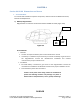
b) GDC 74H, Air Data Computer
GDC 74H is located underneath the cabin floor between station 2249 and 2737 on the left
side of the aircraft. (Figure 6-02)
Access Methods
i. Removal
1. Un-latch the Center lower belly access panel.
2. Disconnect the retaining straps that prevent the panel from falling to the floor.
3. If aftermarket items are attached to the Center lower belly panel it may be
necessary to remove or disconnect them in order to remove the lower belly panel.
Consult the manufacturers Installation and Removal instructions for proper
removal of items.
ii. Installation
1. Re-install aftermarket items if removed to gain access to the air data computer.
Consult the manufacturers Installation and Removal instructions for proper
installation of items.
2. Connect the retaining strap that was disconnected to gain access to the air data
computer.
3. Close the Center lower belly access panel and latch it.
Caution: Use of power tools during removal or installation
of panels and attaching hardware may damage nut plates
or deform holes in composite doors, covers, panels, and
fairings.
06-00-00
Figure 6-02
GDC 74H
STA
2249
REF
STA
2737
REF