
Instruction Manual


G500H Flight Display System 190-01150-11 Rev. 2
Instructions for Continued Airworthiness Bell 206A/B Series Page 12 of 19
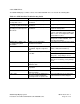
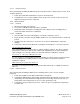
Alert Text Cause Solution
FAN 2 FAIL
Fan 2 has reported 0 RPM when it
was powered with a PWM duty
cycle higher than or equal to 10%
Inspect the GDU fan for an obstruction.
Contact Garmin Technical Support.
GDL69 CONFIG
The GDL 69 configuration
information stored in the GDL 69
and the GDU 620 configuration
module do not match.
With the GDU 620 in configuration mode,
go to the GDL 69 page in the GDL page
group. Verify that the SET and ACTIVE
configuration settings are the same. If
not, use the SET>ACTV soft key to copy
the configuration settings from the GDU
620 into the GDL 69.
The GDL 69 configuration was
updated using another LRU
(e.g. the GMX 200 or 400W/500W).
Update the GDL 69 configuration using
the GDU 620.
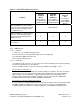
GDU CONFIG
This error appears whenever the
GDU is replaced with a GDU that
was configured for a different
installation.
Cycle power to the GDU. This error
automatically clears on the second power
up with a different configuration module.
Error in the configuration of the
GDU 620.
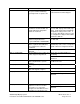
GDU (1/2) COOLING
Specific GDU has poor cooling, and
power usage is being reduced.
Ensure fans on indicated GDU are
functioning
Ensure fans on indicated GDU are not
obstructed
GDU (1/2) DB ERR
Error in specific database, where
GDU (1/2) DB denotes specific
database.
Verify the correct card is installed, reload
the DB on the card.
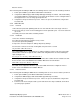
GDU (1/2) VOLTAGE
GDU supply voltage is below 12
VDC.
Increase the voltage above 12VDC.
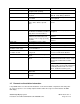
GEO LIMITS
Location is too far north/south for
GRS 77H magnetic compass.
GPS(1/2) FAIL No GPS1 or GPS2 data is available.
Ensure GPS (1/2) is turned on
Verify RS-232 wiring from the GPS to the
GDU 620.
GPS(1/2) PPS Failure
This alert will be set if the PPS
signal has not been received in
more than 5 sec. If the unit is
configured for dual GPSs then the
side will be specified in the error.
Ensure GPS (1/2) is turned on
Verify 1PPS wiring from the GPS to the
GDU 620.