
User Guide




190-00647-00 Rev. A
Garmin G1000 Pilot’s Guide for the Mooney M20M/M20R/M20TN
2-19
FLIGHT INSTRUMENTS
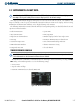
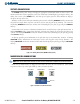
SYSTEM TIME
The system time is displayed in the lower right corner of the PFD. Three display formats are available, local
12-hr, local 24-hr, and Coordinated Universal Time (UTC). Time and date are obtained from the GPS satellites
and cannot be changed, although a time offset may be entered (±HH:MM) for local times.
Figure 2-25 System Time
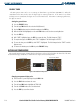
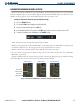
Configuring the system time:
1) Select the AUX - System Setup Page using the FMS Knob.
2) Press the FMS Knob to activate the cursor.
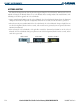
3) Turn the large FMS Knob to highlight the TIME FORMAT field (Figure 2-27).
4) Turn the small FMS Knob to select the desired format.
5) Press the ENT Key to confirm selection. The TIME OFFSET field is highlighted.
6) Enter the desired time offset (±HH:MM).
7) Press the ENT Key to confirm selection.
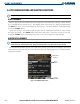
Figure 2-26 System Setup Page,
Display Units Settings
Figure 2-27 System Setup Page,
Date/Time Settings