
User Guide




Garmin G1000 Pilot’s Guide for the Mooney M20M/M20R/M20TN
190-00647-00 Rev. A6-24
HAZARD AVOIDANCE
The selected range settings on the Data Link Setup Window (Figure 6-33) control the largest map range
at which each weather product displays on the Weather Data Link Page. Table 6-3 lists every map range
option for all XM WX Satellite Weather products.
Data Range Options (in nm unless otherwise indicated)
NEXRAD Data 10 15 20 30 50 80 100 150 200 300 500 800 1000 1500 2000
Echo Top Data
10 15 20 30 50 80 100 150 200 300 500 800 1000 1500 2000
Cloud Top Data
10 15 20 30 50 80 100 150 200 300 500 800 1000 1500 2000
LTNG Data
10 15 20 30 50 80 100 150 200 300 500 800 1000 1500 2000
CELL MOV Data
10 15 20 30 50 80 100 150 200 300 500 800 1000 1500 2000
SIG/AIR 10 15 20 30 50 80 100 150 200 300 500 800 1000 1500 2000
METAR Data
1 1.5 2 3 5 8 10 15 20 30 15 80 100 200 300
500 800 1000 1500 2000 3000 5000
SFC Data 10 15 20 30 50 80 100 150 200 300 500 800 1000 1500 2000
SFC Time
Current 12 HR 24 HR 36 HR 48 HR
FRZ LVL Data
10 15 20 30 50 80 100 150 200 300 500 800 1000 1500 2000
WND ALF Data
10 15 20 30 50 80 100 150 200 300 500 800 1000 1500 2000
WND ALF ALT
SURFACE
3000 6000 9000 12000 15000 18000 21000 24000 27000 30000 33000 36000 39000 42000
COUNTY Data 10 15 20 30 50 80 100 150 200 300 500 800 1000 1500 2000
CYCLONE Data 10 15 20 30 50 80 100 150 200 300 500 800 1000 1500 2000
Table 6-3 Map Range Settings
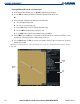
Setting up and customizing the Weather Data Link Page:
1) On the Weather Data Link Page, press the
MENU
Key.
2) While the Weather Setup selection is highlighted, press the
ENT
Key.
3) Turn the large
FMS
Knob or the
ENT
Key to highlight and move between the products.
4) Turn the small
FMS
Knob to move between the options for each product (for example, ‘Yes’, ‘No’, or Map
Range).
5) Press the
ENT
Key to select an option.
6) Press the
MENU
Key to restore the default settings.