
User Guide




5-103190-00647-00 Rev. A
Garmin G1000 Pilot’s Guide for the Mooney M20M/M20R/M20TN
GPS NAVIGATION
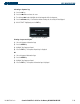
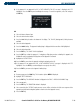
Activating a departure leg:
1) Press the
FPL
key.
2) Press the
FMS
knob to activate the cursor.
3) Turn the large
FMS
knob to highlight the desired waypoint within the departure.
4) Press the
ACT LEG
softkey. A confirmation window showing the selected leg will be displayed.
5) With ‘ACTIVATE’ highlighted, press the
ENT
key.
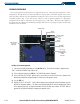
Figure 5-89 Activate Leg Option
Viewing a Departure Airport:
1) Select the Departure Information Page.
2) Press the M
ENU
Key.
3) Highlight ‘View Departure Airport’.
4) Press the E
NT
Key. The Departure Airport Page is displayed.
OR:
1) Select the Approach Information Page.
2) Press the M
ENU
Key.
3) Highlight ‘View Departure Airport’.
4) Press the E
NT
Key. The Departure Information Page is displayed.