
User Guide





5-102 190-00647-00 Rev. A
Garmin G1000 Pilot’s Guide for the Mooney M20M/M20R/M20TN
GPS NAVIGATION
OR:
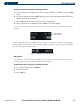
1) With the Departure Loading Page displayed (Figure 5-88), press the
FMS
Knob to activate the cursor.
2) Enter an identifier, facility name or city location field.
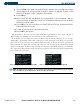
3) Press the E
NT
Key until the DEPARTURE window is displayed.
4) Select a departure.
5) Press the E
NT
Key. The RUNWAY window may be displayed.
6) Select a runway.
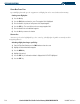
7) Press the E
NT
Key. The TRANSITION window may be displayed.
8) Select a transition.
9) Press the E
NT
Key. At this point it is loaded and the Active Flight Plan Page is displayed.
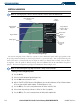
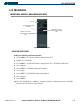
Figure 5-88 Departure Loading Page
Identifier
Facility Name
Location
Available
Departures
List of Legs
in Departure
Sequence
Map Showing
Selected
Departure
Airport
Symbol
Airport Usage