
User Guide





5-101190-00647-00 Rev. A
Garmin G1000 Pilot’s Guide for the Mooney M20M/M20R/M20TN
GPS NAVIGATION
5.19 PROCEDURES
DEPARTURES, ARRIVALS, AND APPROACHES (MFD)
Options
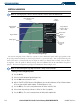
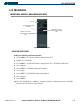
Figure 5-87 Procedures Window
Approach Procedure
Loaded in Active Flight
Plan
Arrival Loaded in Active
Flight Plan
Departure Procedure
Loaded in Active Flight
Plan
DEPARTURE OPERATIONS
Loading and activating a departure procedure:
1) Press the
PROC
Key. The Procedures Window is displayed (Figure 5-87).
2) Highlight ‘SELECT DEPARTURE’.
3) Press the E
NT
Key. The DEPARTURE window is displayed on the ‘PROC – DEPARTURE LOADING Page.
4) Select a departure.
5) Press the E
NT
Key. The RUNWAY window may be displayed.
6) Select a runway.
7) Press the E
NT
Key. The TRANSITION window may be displayed.
8) Select a transition.
9) Press the E
NT
Key.
10) With ‘LOAD’ highlighted, press the
ENT
Key. The departure procedure is displayed as part of the overall flight
plan and is placed in front of the enroute flight plan.