
User Guide



5-86 190-00647-00 Rev. A
Garmin G1000 Pilot’s Guide for the Mooney M20M/M20R/M20TN
GPS NAVIGATION
DELETING THE ACTIVE FLIGHT PLAN
‘Delete Flight Plan’ removes all waypoints from the active flight plan. Deleting a flight plan does not delete
the waypoints contained in the flight plan from the database or user waypoint memory.
Delete a flight plan:
1) From the Active Flight Plan page, press the
MENU
Key.
2) Highlight ‘Delete Flight Plan’
3) Press the
ENT
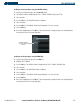
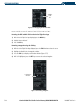
Key. The ‘Delete Flight Plan?’ window is displayed (Figure 5-73).
4) Select ‘OK’.
5) Press the
ENT
Key. To cancel the operation, highlight ‘Cancel’ and press the
ENT
Key.
Figure 5-73 Delete Flight Plan
REMOVING AN APPROACH, ARRIVAL, OR DEPARTURE
• ‘Remove Departure’ deletes the current DP from the active flight plan.
• ‘Remove Arrival’ deletes the current STAR from the active flight plan.
• ‘Remove Approach’ deletes the currently selected approach from the active flight plan.
Removing an approach, arrival, or departure:
1) From the Active Flight Plan Page, press the
MENU
Key.
2) Select the ‘Remove Approach’, ‘Remove Arrival’ or ‘Remove Departure’ option.
3) Press the
ENT
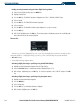
Key. A confirmation window is displayed listing the procedure.
4) With ‘OK’ highlighted, press the
ENT
Key. To cancel the removal request, highlight ‘CANCEL’ and press the
ENT
Key.
Removing an individual waypoint:
1) From the Active Flight Plan Page, select the waypoint that is to be deleted.
2) Press the
CLR
Key. A confirmation window is displayed listing the waypoint.
3) With ‘OK’ highlighted, press the
ENT
Key. To cancel the removal request, highlight ‘CANCEL’ and press the
ENT
Key.