
User Guide




5-75190-00647-00 Rev. A
Garmin G1000 Pilot’s Guide for the Mooney M20M/M20R/M20TN
GPS NAVIGATION
OR:
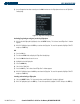
Copying a flight plan to another flight plan catalog location:
1) From the Flight Plan Catalog Page, press the
FMS
Knob to activate the cursor.
2) Highlight the desired flight plan.
3) Press the
MENU
Key.
4) Highlight ‘Copy Flight Plan’.
5) Press the
ENT
Key. A ‘Copy to flight plan?’ confirmation window is displayed.
6) With ‘OK’ highlighted, press the
ENT
Key to copy the flight plan. To cancel, highlight ‘CANCEL’ and press the
ENT
Key.
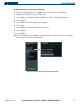
Deleting a flight plan:
1) From the Flight Plan Catalog Page, press the
FMS
Knob
to activate the cursor.
2) Highlight the flight plan to delete.
3) Select the
DELETE
Softkey.
4) Press the
ENT
Key. A ‘Delete flight plan?’ confirmation window is displayed.
5) With ‘OK’ highlighted, press the
ENT
Key to delete the flight plan. To cancel, highlight ‘CANCEL’ and press the
ENT
Key:
OR:
1) From the Flight Plan Catalog Page, press the
FMS
Knob
to activate the cursor.
2) Highlight the flight plan to delete.
2) Press the
MENU
Key.
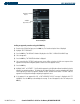
3) Highlight ‘Delete Flight Plan’.
4) Press the
ENT
Key. A ‘Delete flight plan?’ confirmation window is displayed.
5) With ‘OK’ highlighted, press the
ENT
Key to delete the flight plan. To cancel, highlight ‘CANCEL’ and press the
ENT
Key:
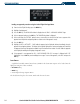
Deleting all flight plans:
1) From the Flight Plan Catalog Page, press the
MENU
Key.
2) Highlight ‘Delete All’ and press the
ENT
Key. A ‘Delete all flight plans?’ confirmation window is displayed.
3) With ‘OK’ highlighted, press the
ENT
Key to delete all flight plans. To cancel, highlight ‘CANCEL’ and press the
ENT
Key.