
User Guide





190-00649-00 Rev. A
Garmin G1000 Pilot’s Guide for the Diamond DA42
4-19
AUDIO PANEL AND CNS
4.4 COM OPERATION
FREQUENCY SPACING
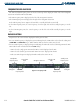
The G1000 COM radios can tune either 25 kHz spacing (118.000 to 136.975 MHz) or 8.33 kHz spacing
(118.000 to 136.990 MHz) for 760-channel or 3040-channel configuration.
COM channel spacing is configured through the MFD on the System Setup Page of the AUX Page Group.
25 kHz Channel
Spacing
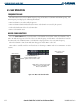
Figure 4-19 8.33 and 25 kHz Spacing
8.33 kHz Channel
Spacing
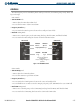
Changing COM Frequency Channel Spacing:
1) Select the AUX – System Setup Page
2) Press the FMS Knob to activate the flashing cursor.
2) Turn the large FMS Knob to highlight the Channel Spacing Field in the COM Configuration Box.
3) Turn the small FMS Knob to select the desired spacing
4) Press the ENT Key.
Figure 4-20 AUX – System Setup Page
Select 8.33 kHz
or 25.0 kHz
COM Frequency
Channel Spacing
AUX - SYSTEM
SETUP PAGE