
User Guide





190-00649-00 Rev. A
Garmin G1000 Pilot’s Guide for the Diamond DA42
4-17
AUDIO PANEL AND CNS
RADIO INDICATORS
•
RX
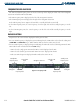
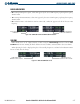
– During COM signal reception, a white ‘RX’ appears by the active COM frequency replacing the Frequency
Transfer Arrow.
• TX – During COM transmission, a white ‘TX’ appears by the active COM frequency replacing the Frequency
Transfer Arrow.
• ID – When the Morse code identifier is ON for a NAV radio, a white ‘ID’ appears to the left of the active NAV
frequency.
The Morse code identifier
is ON for the GHM VOR
Figure 4-16 COM Radio Transmit and NAV Radio ID Indications
Receive and Transmit
Indications
VOLUME
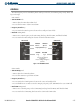
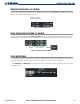
Radio volume level can be adjusted from 0 to 100% using the
VOL/PUSH SQ
Knob for COM or
VOL/
PUSH ID
Knob for NAV. Turning the knob clockwise increases volume, counterclockwise decreases volume.
When adjusting, the level is displayed in place of the standby frequencies. Volume level indication remains
for two seconds after the change.
NAV Volume Level
Remains for Two Seconds
Figure 4-17 NAV and COM Volume Levels
COM Volume Level
Remains for Two Seconds