
User Guide





Garmin G1000 Pilot’s Guide for the Diamond DA42
190-00649-00 Rev. A4-16
AUDIO PANEL AND CNS
TUNING BOX
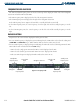
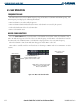
A light blue tuning box is displayed around the radio standby frequency field on both the PFD and MFD.
Pressing the small
COM
or
NAV
Knob transfers the tuning box back and forth between the two fields.
Frequencies located in the standby field are displayed in either white or gray. The standby frequency in the
tuning box is white. The other standby frequency is gray.
Frequency Transfer Arrow
Tuning Box
Figure 4-14 Frequency Transfer Arrow and Tuning Box
SWITCHING BETWEEN RADIOS
Pressing the small
COM
or
NAV
Knob transfers the tuning box between the radio frequency fields.
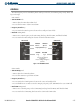
When a different COM transceiver is selected on the audio panel, the COM frequency tuning box highlights
the frequency on both the PFD and MFD.
When a different NAV radio is selected on the HSI, the NAV frequency tuning box highlights the frequency
on the PFD and MFD. The NAV frequency tuning box does not change when GPS Mode is selected.
Pushing the small
COM
knob
switches the tuning box from one
COM radio to the other.
Pushing the small
NAV
knob
switches the tuning box from one
NAV radio to the other.
Figure 4-15 Switching NAV and COM Radios
MANUALLY TUNING A FREQUENCY
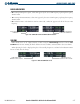
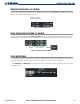
The dual
COM
and dual
NAV
Frequency Knobs can be used for manual COM and NAV radio tuning. The
frequencies are tuned in the standby field.
• The MHz frequency digits are tuned with the large
COM
and
NAV
Knobs.
• The kHz frequency digits are tuned with the small
COM
and
NAV
Knobs.
Turning the knobs clockwise increases frequency. Turning the knobs counterclockwise decreases frequency.