
User Guide





Garmin G1000 Pilot’s Guide for the Diamond DA42
190-00649-00 Rev. A4-14
AUDIO PANEL AND CNS
FREQUENCY BOXES AND FIELDS
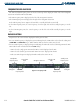
The NAV and COM frequency boxes are located at the top of the display on either side of the Navigation
Status Box on both the PFD and the MFD.
• The NAV
Frequency Box is displayed to the left of the Navigation Status Box.
• The COM
Frequency Box is displayed to the right of the Navigation Status Box.
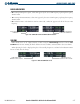
Each radio frequency box is composed of two fields, a
standby field and an active
field.
• In the NAV Frequency Box, the active frequency is on the right side and the standby frequency is on the
left.
• In the COM Frequency Box, the active frequency is on the left side and the standby frequency is on the
right.
RADIO SELECTION
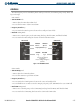
Frequencies in the active
field are displayed in either green
or
white.
• An active COM frequency is displayed in green indicating that the COM radio is selected on the audio panel
(
COM1 MIC
or
COM2 MIC
Keys). White numbers indicate that the radio is not selected.
• An active NAV frequency is displayed in green indicating the NAV radio is selected for navigation on the HSI.
NAV radio selection is made with the PFD
CDI
Softkey.
- NAV1 selected: a single green arrow with ‘
VOR1’ or ‘LOC1’ displayed on the HSI.
- NAV2 selected: a double green arrow with ‘
VOR2’ or ‘LOC2’ displayed on the HSI.
- Both active NAV frequencies displayed in white indicate that GPS is in use.
Standby NAV
Frequency Field
Active NAV
Frequency Field
Active COM
Frequency Field
Standby COM
Frequency Field
Figure 4-12 Frequency Fields
Selected NAV
Radio
Navigation Status Box
Tuning Box
Tuning Box
Selected COM
Radio