
User Guide




Garmin G1000 Pilot’s Guide for the Diamond DA42
190-00649-00 Rev. A4-6
AUDIO PANEL AND CNS
TRANSMITTING
NOTE:
Audio level of the COM radio(s) is controlled by the COM volume controls located on both the PFD
and the MFD.
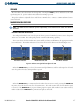
When the active COM is transmitting, the active transceiver COM MIC Key Annunciator flashes
approximately once per second. A white TX indication appears next to the active COM frequency on both
displays during transmission.
SECONDARY COM MUTING ON RECEIVE AND TRANSMIT
All secondary COM audio is muted during detection of received primary COM audio as well as during
transmission over the primary COM radio.
SPLIT COM FUNCTION
NOTE
: Split COM performance is affected by the distance between the antennas and the separation of the
tuned frequencies. Split COM is not recommended for use in DA42 Aircraft.
During split COM operation, both the pilot and the copilot can transmit simultaneously over separate radios.
The pilot can still monitor NAV1, NAV2, ADF, DME, and MKR audio as selected, but the copilot is only able to
monitor COM2.
Pressing the
COM 1/2
Key selects the split COM function. During split COM operation, the
COM1 MIC
,
COM1
,
COM2 MIC,
COM2,
and
COM 1/2
Keys are active.
When the
COM 1/2
Key is selected, COM1 is used by the pilot for transmission and COM2 is used by the
copilot. The COM1 MIC Annunciator flashes when the pilot’s microphone PTT is pressed and the COM2 MIC
Annunciator flashes when the copilot’s microphone PTT is pressed.
Split COM Mode is cancelled by pressing the
COM 1/2
Key again.
PA FUNCTION
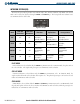
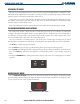
By pressing the
PA
Key, a passenger address function is provided for delivering voice messages over the cabin
speaker. Push-to-talk (PTT) must be pressed to deliver PA announcements.
When PA is selected on the audio panel, the PA annunciator flashes once per second while the PTT Key is
pressed. Also, the COM MIC Annunciator is extinguished and the active COM frequency changes to white,
indicating that there is no COM selected.
Figure 4-3 Passenger Address and Speaker Keys