
User Guide


Garmin G1000 Pilot’s Guide for the Diamond DA42
190-00649-00 Rev. A3-6
EIS
3.4 FUEL DISPLAY
NOTE: Fuel calculations do not use the aircraft fuel quantity indicators and are calculated from the last time
the fuel was reset.
NOTE: If optional auxiliary fuel tanks are installed, the fuel remaining can be adjusted up to a maximum of
76.4 gal; the Fuel Quantity Indicator does not account for fuel in the auxiliary tanks.
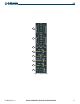
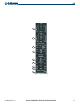
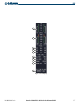
The Fuel Display is accessed by pressing the
FUEL
Softkey. Besides the engine load indicator and tachometer,
all indications on this display are digital readouts, separated into two categories: Fuel and Fuel Calculations. Total
aircraft time in service is at the bottom of the display.
Fuel calculations are based on the fuel flow totalizer and the displayed fuel remaining, adjusted by the pilot
using the following softkeys:
• DEC FUEL – Decreases totalizer-based fuel remaining in one-gallon increments
• INC FUEL – Increases totalizer-based fuel remaining in one-gallon increments
• RST FUEL – Resets totalizer-based fuel remaining to the aircraft’s fuel capacity and the GAL USED to zero
1
Engine Load Indicator
(LOAD %)
Shows current engine loads as percentages on a vertical bar gauge with
digital readouts below
2
Tachometer
(RPM)
Shows propeller speeds in revolutions per minute (rpm) on a vertical slider
gauge with digital readouts below (digits flash red to indicate an overspeed
warning); indications follow propeller speed information provided by the
FADEC
3
Fuel Quantity Indicator
(FUEL GAL)
Shows a digital readout of fuel in the tanks, in gallons
4
Fuel Flow Indicator
(FUEL GPH)
Shows a digital readout of current fuel flow for each engine in gallons per
hour (gph)
5
Fuel Temperature Indicator
(FUEL °C)
Shows a digital readout of fuel temperature for each tank in degrees
Celsius
6
Set Fuel Remaining
(GAL REM)
Shows current fuel remaining in gallons as set by the pilot and adjusted for
fuel burn since last set
7
Calculated Fuel Used
(GAL USED)
Shows quantity of fuel used in gallons based on fuel flow since last reset
8
Calculated Endurance
(ENDUR)
Shows flight time remaining based on the calculated fuel remaining (HH:
MM)
9
Calculated Range
(RANGE NM)
Shows aircraft range in nautical miles based on the calculated fuel
remaining
10
Total Time in Service
(TTL TIME IN SVC)
Shows the aircraft’s total flight hours; activated when the aircraft becomes
airborne