
User Guide


Garmin G1000 Pilot’s Guide for the Diamond DA42
190-00649-00 Rev. A3-4
EIS
3.3 SYSTEM DISPLAY
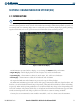
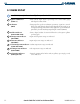
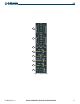
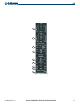
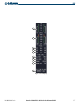
The System Display is accessed by pressing the SYSTEM Softkey. The instruments presented here, in addition to
the engine load indicator and tachometer, are separated into three categories: Electrical (voltmeter and ammeter),
Engine (gearbox and coolant temperature), and Oil (temperature and pressure). A horizontal bar indicator for
deice fluid is located at the bottom of the display as an option.
1
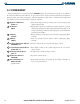
Engine Load Indicator
(LOAD %)
Shows current engine loads as percentages on a vertical bar gauge with
digital readouts below
2
Tachometer
(RPM)
Shows propeller speeds in revolutions per minute (rpm) on a vertical
slider gauge with digital readouts below (digits flash red to indicate an
overspeed warning); indications follow propeller speed information
provided by the FADEC
3
Voltmeter
(VOLTS)
Shows the primary bus voltage for each side with accompanying digital
readouts
4
Ammeter
(AMPS)
Shows each alternator load in amperes with accompanying digital
readouts
5
Gearbox Temperature Indicator
(GEARBOX °C)
Shows the temperature of each gearbox in degrees Celsius
6
Coolant Temperature Indicator
(COOLANT °C)
Shows digital readouts of the coolant temperatures of each side in
degrees Celsius
7
Oil Temperature Indicator
(OIL °C)
Oil temperature is shown in degrees Celsius
8
Oil Pressure Indicator
(OIL BAR)
Oil pressure is shown in bars
9
Deice Fluid Indicator
(DEICE FLUID)
optional indicator
Optional indicator shows the quantity of deice fluid; tick marks are
located at quarter intervals