
User Guide

190-00649-00 Rev. A
Garmin G1000 Pilot’s Guide for the Diamond DA42
2-17
FLIGHT INSTRUMENTS
SYSTEM TIME
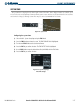
The system time is displayed in the lower right corner of the PFD. Three display formats are available, local
12-hr, local 24-hr, and Coordinated Universal Time (UTC). Time and date are obtained from the GPS satellites
and cannot be changed, although a time offset may be entered (±HH:MM) for local times.
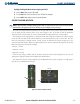
Figure 2-25 System Time
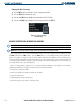
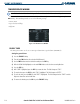
Configuring the system time:
1) Select the AUX - System Setup Page using the FMS Knob.
2) Press the FMS Knob to activate the cursor. The TIME FORMAT field is highlighted.
3) Turn the small FMS Knob to select the desired format.
4) Press the ENT Key to confirm selection. The TIME OFFSET field is highlighted.
5) Use the FMS Knob to enter the desired time offset (±HH:MM) with the FMS Knob.
6) Press the ENT Key to confirm selection.
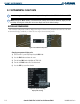
Figure 2-26 System Setup Page,
Date/Time Settings