
User Guide

Garmin G1000 Pilot’s Guide for the Diamond DA42
190-00649-00 Rev. A2-16
FLIGHT INSTRUMENTS
2.3 SUPPLEMENTAL FLIGHT DATA
NOTE
: Some supplemental PFD information disappears when pitch exceeds +30˚/-20˚ or bank exceeds 65˚.
NOTE: Pressing the DFLTS Softkey (a second-level PFD softkey) turns off metric Altimeter display and the
Inset Map. Pressing this softkey does not restore display units to the default settings.
OUTSIDE AIR TEMPERATURE
The outside air temperature (OAT) is displayed in degrees Celsius (°C) by default in the lower left of the PFD
under normal display conditions, or below the true airspeed in reversionary mode.
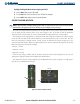
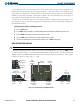
Figure 2-23 Outside Air Temperature
Normal Display Reversionary Mode
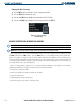
Changing temperature display units:
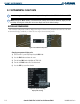
1) Select the AUX - System Setup Page using the FMS Knob.
2) Press the FMS Knob to activate the cursor.
3) Turn the large FMS Knob to highlight the TEMP field.
4) Turn the small FMS Knob to select the desired unit.
5) Press the ENT Key to confirm selection.
Figure 2-24 System Setup Page,
Display Units Settings