
User Guide

190-00649-00 Rev. A
Garmin G1000 Pilot’s Guide for the Diamond DA42
2-13
FLIGHT INSTRUMENTS
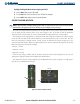
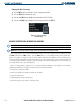
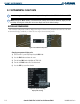
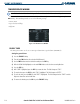
Enabling/disabling OBS Mode while navigating with GPS:
1) Press the OBS Softkey to select OBS Mode.
2) Turn the CRS Knob to select the desired course TO/FROM the waypoint.
3) Press the OBS Softkey again to return to normal operation.
COURSE DEVIATION INDICATOR
NOTE
: If the pilot makes a heading change greater than 105˚ with respect to the course, the CDI on the Arc
HSI switches to the opposite side of the deviation scale and displays reverse sensing.
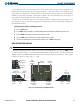
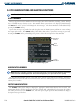
The Course Deviation Indicator (CDI) moves left or right from the course pointer along a lateral deviation
scale to display aircraft position relative to the course (Figure 2-20). If the CDI exceeds the maximum
deviation on the scale (two dots), the crosstrack error (XTK) is displayed below the aircraft symbol.
The CDI has the same angular limits as a mechanical CDI when coupled to a VOR or LOC. When coupled
to GPS, the full scale limits for the CDI are defined by a GPS-derived distance (5.0, 1.0, or 0.3 nm). The GPS
CDI scale setting may be changed (5.0 nm, 1.0 nm, 0.3 nm, or AUTO) on the System Setup Page (see the
System Overview for details). When set to AUTO (default), the CDI scale automatically adjusts to the desired
limits based upon the current phase of flight:
• Enroute – 5.0 nm
• Terminal – 1.0 nm
• Approach – 0.3 nm
If the selected scaling is smaller than the automatic setting for enroute and terminal phases, the selected
setting may be displayed rather than the Flight Phase Annunciation.
The current GPS CDI scale setting is displayed as ‘SYSTEM CDI’ on the System Setup Page. ILS CDI capture
may also be set to MANUAL on this page.
Figure 2-20 Course Deviation Indicator
CDI
Arc HSI
CDI
360º HSI