
User Guide






Garmin G1000 Pilot’s Guide for the Diamond DA42
190-00649-00 Rev. A2-12
FLIGHT INSTRUMENTS
NAVIGATION SOURCE
The HSI can display two sources of navigation: GPS or NAV (VOR, localizer, and glideslope). The CDI
Softkey cycles through the navigation sources. Color indicates the current navigation source: magenta (for
GPS) or green (for VOR and LOC).
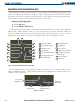
Figure 2-19 GPS INTEG, GPS SUSP, LOC1, and VOR2
‘INTEG’ (Loss of Integrity–GPS integrity is insufficient for the current phase of flight) or ‘WARN’ (GPS
position error) annunciations may appear in yellow on the HSI to indicate abnormal GPS conditions.
Changing navigation sources:
1) Press the CDI Softkey to change from GPS to VOR1 or LOC1. The light blue tuning box is placed over the NAV1
standby frequency in the upper left corner of the PFD.
2) Press the CDI Softkey again to change from VOR1 or LOC1 to VOR2 or LOC2. The light blue tuning box is placed
over the NAV2 standby frequency.
3) Press the CDI Softkey a third time to return to GPS.
OBS MODE
NOTE
: The OBS Softkey is available only when navigating an active leg using GPS.
Enabling Omni-Bearing Selector (OBS) Mode (with the OBS Softkey) suspends the automatic sequencing
of waypoints in a GPS flight plan (GPS must be the selected navigation source), but retains the current
“active-to” waypoint as the navigation reference even after passing the waypoint. When OBS is disabled
(the OBS Softkey is pressed again), the GPS returns to normal operation, with automatic sequencing of
waypoints. OBS Mode also allows a desired course TO/FROM a waypoint to be set (with the CRS Knob);
pressing the CRS Knob recenters the CDI and returns the course pointer TO the waypoint bearing.
As the aircraft crosses the missed approach point (MAP), automatic approach waypoint sequencing is
suspended. ‘SUSP’ appears on the HSI (to the lower right of the aircraft symbol) in place of ‘OBS’ and
the
OBS
Softkey label changes to SUSP. Pressing the SUSP Softkey resumes automatic of approach
waypoints.