
User Guide





Garmin G1000 Pilot’s Guide for the Diamond DA42
190-00649-00 Rev. A2-8
FLIGHT INSTRUMENTS
ALTIMETER BAROMETRIC SETTING
The Altimeter barometric pressure setting is displayed below the Altimeter in inches of mercury (in Hg) or
hectopascals (hPa) when the METRIC Softkey is pressed.
Selecting barometric pressure:
Turn the BARO (outer) Knob to select the desired setting.
Selecting standard barometric pressure (29.92 in Hg):
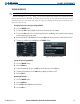
1) Press the PFD softkey.
2) Press the STD BARO softkey.
ALTITUDE REFERENCE
The Altitude Reference is displayed above the Altimeter in a box. A bug corresponding to this altitude is
shown on the tape; if the Altitude Reference exceeds the range shown on the tape, the bug appears at the
corresponding edge of the tape. The metric value, when selected, is displayed in a separate box above the
Altitude Reference.
Setting the Altitude Reference:
Turn the ALT Knob to set the Altitude Reference (large knob for 1000-ft increments, small for 100-ft
increments).
METRIC DISPLAY
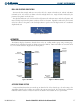
Reference and current altitudes can be displayed in meters (metric readouts are displayed above the readouts
in feet) and the Altimeter barometric setting in hectopascals (see Figure 2-11). Note that the altitude tape
does not change scale.
Displaying altitude and Altimeter barometric pressure setting in metric units:
1) Press the PFD Softkey to display the second level softkeys.
2) Press the METRIC Softkey to display altitude in meters and barometric pressure in hectopascals. Press the
METRIC Softkey again to deselect metric display.
3) Press the BACK Softkey to return to the top level softkeys.