
User Guide





190-00649-00 Rev. A
Garmin G1000 Pilot’s Guide for the Diamond DA42
1-37
SYSTEM OVERVIEW
1.8 DISPLAY BACKLIGHTING
NOTE:
No other window can be displayed on the PFD while the PFD Setup Menu is displayed. Pressing the
MENU Key while any other PFD window is displayed does not display the PFD Setup Menu.
The backlighting of the PFD and MFD displays and bezel and Audio Panel keys can be adjusted automatically
or manually. Backlighting intensity ranges from 0.14% to 100%.
The default setting (automatic backlighting adjustment) uses photocell technology to automatically adjust for
ambient lighting conditions. Photocell calibration curves are pre-configured to optimize display appearance
through a broad range of cockpit lighting conditions.
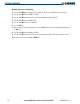
Manually adjusting display backlighting:
1) Press the PFD
MENU
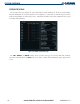
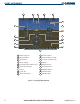
Key to display the PFD Setup Menu. ‘AUTO’ is now highlighted next to ‘PFD DSPL’.
Figure 1-35 PFD Setup Menu
2) Turn the
small FMS
Knob to select ‘MANUAL’.
3) Press the
ENT
Key.
4) With the intensity value now highlighted, turn the
small FMS
Knob to select the desired backlighting, then press
the
ENT
Key.
5) Turn the
large FMS
Knob to highlight ‘AUTO’ next to ‘MFD DSPL’ and repeat steps 2-4.
6) To remove the menu, press the
CLR
or
MENU
Key.