
User Guide





190-00649-00 Rev. A
Garmin G1000 Pilot’s Guide for the Diamond DA42
1-35
SYSTEM OVERVIEW
ELECTRONIC CHECKLISTS (OPTIONAL)
NOTE: The checklist information described in this section is not intended to replace the checklist information
described in the Diamond Information Manual and the Pilot Safety and Warning Supplements document.
NOTE: Garmin is not responsible for the content of the checklists. User-defined checklists are created by
the aircraft manufacturer. Modifications or updates to the checklists are coordinated through the aircraft
manufacturer. The user cannot edit the checklists.
The MFD is able to display electronic checklists customized for the Diamond DA42. The G1000 accesses
the checklists from an SD card inserted into the bezel slot (see Figure 1-3). Pressing the CHKLIST Softkey
allows access to all checklists. Pressing the EXIT Softkey or momentarily holding down the CLR Key exits the
Checklist Page and returns to the page last viewed.
If the SD card contains a valid checklist file, the power-up splash screen displays both the aircraft make and
model to which the checklist applies and copyright information. If the SD card contains an invalid checklist file
or no checklist, the Checklist Page displays ‘INVALID CHECKLIST’ or ‘CHECKLIST NOT PRESENT’ and the
CHKLIST Softkey is greyed out. Pressing the EMERGCY Softkey accesses the emergency procedures.
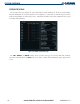
The Checklist Page displays the following:
• Selected procedure group
(number of procedure groups
depends on airframe)
• Selected checklist title
• Selected checklist text:
– Plain text
– Notes, Cautions, and
Warnings
– Challenge/Response pairs
– Challenges with no responses
– Check state of items
– Checklist complete indicator
Checklist Page Icon
Figure 1-33 Checklist Page Example
Checklist Group
Checklist Number