
User Guide





190-00649-00 Rev. A
Garmin G1000 Pilot’s Guide for the Diamond DA42
1-34
SYSTEM OVERVIEW
SYSTEM STATUS PAGE
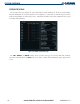
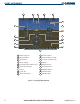
The System Status Page displays the status and software version numbers for all detected system LRUs.
Pertinent information on all system databases is also displayed. Active LRUs are indicated by green check
marks and failed LRUs are indicated by red ‘X’s. Failed LRUs should be noted and a Diamond service center
or Garmin dealer informed.
Figure 1-32 Example System Status Page
The LRU, ARFRM, and DBASE softkeys on the System Status Page select the list (LRU Info, Airframe,
or Database) through which the FMS Knob can be used to scroll if all the information cannot appear on the
screen.