
User Guide





190-00649-00 Rev. A
Garmin G1000 Pilot’s Guide for the Diamond DA42
1-32
SYSTEM OVERVIEW
Changing the CDI range:
1) Select the System Setup Page.
2) Press the FMS Knob momentarily to activate the flashing cursor.
3) Turn the large FMS Knob to highlight the selected field in the GPS CDI Box.
4) Turn the small FMS Knob to highlight the desired selection from the range list.
5) Press the ENT Key.
Changing the ILS CDI capture setting:
1) Select the System Setup Page.
2) Press the FMS Knob momentarily to activate the flashing cursor.
3) Turn the large FMS Knob to highlight the ILS CDI capture field in the GPS CDI Box.
4) Turn the small FMS Knob to select the desired mode.
5) Press the ENT Key.
COM CONFIGURATION
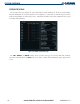
The COM Configuration Box on the System Setup Page allows the pilot to select 8.33 kHz or 25.0 kHz
COM frequency channel spacing.
Changing COM channel spacing:
1) Select the System Setup Page.
2) Press the FMS Knob momentarily to activate the flashing cursor.
3) Turn the large FMS Knob to highlight the channel spacing field in the COM Configuration Box.
4) Turn the small FMS Knob to select the desired spacing.
5) Press the ENT Key.