
User Guide




190-00649-00 Rev. A
Garmin G1000 Pilot’s Guide for the Diamond DA42
1-30
SYSTEM OVERVIEW
ARRIVAL ALERTS
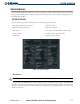
The Arrival Alert Box on the System Setup Page allows arrival alerts to be turned on/off and the alert
trigger distance set. An arrival alert can be set to notify the pilot with a message upon reaching a user-
specified distance from the final destination (the direct-to waypoint or the last waypoint in a flight plan).
Once the set distance (up to 99.9 units) has been reached, an “Arrival at [waypoint]” message is displayed
in the PFD Navigation Status Bar.
Enabling/disabling an arrival alert:
1) Select the System Setup Page.
2) Press the FMS Knob momentarily to activate the flashing cursor.
3) Turn the large FMS Knob to select the ON/OFF field in the Arrival Alert Box.
4) Turn the small FMS Knob clockwise to turn the airspace alert ON or counterclockwise to turn the alert OFF.
Changing the arrival alert trigger distance:
1) Select the System Setup Page.
2) Press the FMS Knob momentarily to activate the flashing cursor.
3) Turn the large FMS Knob to highlight the distance field in the Arrival Alert Box.
4) Turn the FMS Knob to enter a trigger distance and press the ENT Key.
AUDIO ALERTS
The Audio Alert Box on the System Setup Page allows the audio alert voice to be set to male or female.
Changing the audio alert voice:
1) Select the System Setup Page.
2) Press the FMS Knob momentarily to activate the flashing cursor.
3) Turn the large FMS Knob to highlight the voice in the Audio Alert Box.
4) Turn the small FMS Knob to display and highlight the desired voice.
5) Press the ENT Key.