
User Guide




190-00649-00 Rev. A
Garmin G1000 Pilot’s Guide for the Diamond DA42
1-25
SYSTEM OVERVIEW
MFD SYSTEM PAGES
In the Auxiliary (AUX) Page Group, there are two system pages: System Setup and System Status. The System
Setup Page allows management of various system parameters, while the System Status Page displays the status
of all G1000 System LRUs.
SYSTEM SETUP PAGE
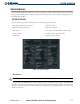
The System Setup Page allows management of the following system parameters:
• Time display format (local or UTC )
• Displayed measurement units
• Map datum
• Airspace alerts
• Arrival alert
• Audio alert voice
• MFD Data Bar fields
• GPS Course Deviation Indicator (CDI) range
• COM transceiver channel spacing
• Displayed nearest airports
Figure 1-31 System Setup Page
PILOT PROFILES
NOTE
: Pilot profile names cannot start with a blank as the first letter in the name
System settings configured on the System Setup Page may be saved under a pilot profile. The G1000 will
store up to 25 profiles; the currently active profile and amount of memory used and available are shown at the
top of the System Setup Page in the Pilot Profile Box. From this box, pilot profiles may be created, selected,
renamed, or deleted.