
User Guide




190-00649-00 Rev. A
Garmin G1000 Pilot’s Guide for the Diamond DA42
8-7
ADDITIONAL FEATURES
Selecting the System Status Page:
1.) Turn the large FMS Knob to select the AUX Page Group.
2) Turn the small FMS Knob to select the System Status Page.
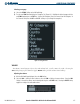
Figure 8-5 LRU Information Box on System Status Page
Alerts Window Message Comment
CHECK ANTENNA GDL 69A antenna error, service is required
UPDATING
GDL 69A is updating encryption code
NO SIGNAL
Loss of signal message appears on XM Radio Page and on Weather Data Link Page,
when the signal strength is too low for the receiver
LOADING
Acquiring channel audio or information
OFF AIR
Channel not in service
--- Missing channel information
WEATHER DATA LINK FAILURE No communication with the GDL 69A within the last five minutes
ACTIVATION REQUIRED XM Data receiver is not activated
GDL69 CONFIG GDL 69A configuration error,
service is required
GDL69 FAIL GDL 69A has failed,
service is required
Table 8-1 Advisory Messages