
User Guide




190-00649-00 Rev. A
Garmin G1000 Pilot’s Guide for the Diamond DA42
1-21
SYSTEM OVERVIEW
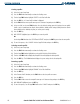
Using the FMS Knob to enter data:
1) If needed, press the FMS Knob to activate the cursor.
2) Use the large FMS Knob to highlight the desired field.
3) Begin entering data by turning the small FMS Knob to select a character for the first placeholder.
Turning the knob to the right scrolls through the alphabet (where appropriate) toward the letter Z, starting in
the middle at K, and the digits zero through nine. Turning the knob to the left scrolls in the opposite direction.
4) Use the large FMS Knob to move the cursor to the next placeholder in the field.
5) Repeat, using the small FMS Knob to select a character and the large FMS Knob to move the cursor, until the
field is complete.
6) Press the ENT Key to confirm entry.
7) Press the FMS Knob or CLR Key to cancel data entry (the field reverts back to its previous information).
PAGE GROUPS
NOTE: Refer to other supporting sections in this Pilot’s Guide for details on specific pages.
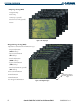
Information on the MFD is presented on pages which are grouped according to function. The page group and
active page title are displayed in the upper center of the screen, below the Navigation Data Box. In the bottom
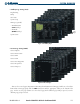
right corner of the screen, the current page group, number of pages available in the group, and placement of
the current page within the group are indicated by icons. For some of these pages (Airport/Procedures/Weather
Information, XM, Procedure Loading), the title of the page may change while the page icon remains the same.
MFD
Figure 1-23 Page Title
Page Group Active Page Title
Figure 1-24 Page Group Icons
Page Groups
Selected Page
Pages in Current Group
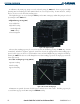
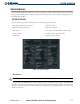
There are four main page groups, navigated using the FMS Knob; specific pages within each group can vary
depending on the configuration of optional equipment.
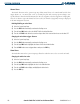
Selecting a page using the FMS Knob:
1) Turn the
large FMS
Knob until the desired page group is selected.
2)
Turn
the
small FMS
Knob until the desired page is selected.