
User Guide



Garmin G1000 Pilot’s Guide for the Diamond DA42
190-00649-00 Rev. A6-42
HAZARD AVOIDANCE
TERRAIN DATA ON THE VNAV PAGE
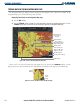
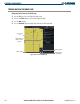
Displaying Terrain Data on the VNAV Page:
1) Press the
FPL
Key to select the Flight Plan Page Group.
2) Turn the small
FMS
Knob to select the VNAV Flight Plan Page.
3) Press the
MAP
Softkey.
5) Press the
TERRAIN
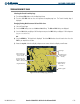
Softkey to display Terrain Data on the VNAV Page Map.
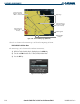
Figure 6-48 Terrain on VNAV Page
Yellow Terrain
Area
Terrain Legend
MAP Softkey
Lighted Obstacles
(Within 100’ of
Aircraft)
Terrain Symbol
and Range