
User Guide



190-00649-00 Rev. A
Garmin G1000 Pilot’s Guide for the Diamond DA42
6-41
HAZARD AVOIDANCE
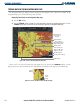
TERRAIN DATA ON THE AUX – TRIP PLANNING PAGE MAP
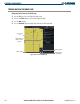
Displaying Terrain on the Trip Planning Page Map:
1) Turn the large
FMS
Knob to select the AUX Page Group.
2) Press the
MAP
Softkey.
3) Press the
TERRAIN
Softkey to display terrain data on the AUX - Trip Planning Page Map.
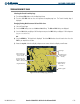
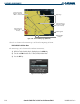
Figure 6-47 Terrain on the AUX- Trip Planning Page
Yellow and Red
Terrain Areas
MAP Softkey
Terrain Symbol
and Range