
User Guide



Garmin G1000 Pilot’s Guide for the Diamond DA42
190-00649-00 Rev. A6-40
HAZARD AVOIDANCE
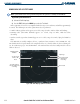
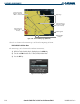
Figure 6-45 Terrain Proximity Page (ARC View)
Map Range
Red Terrain Area
(Within 100’ of
Aircraft)
Yellow Terrain Area
(Between 100’ and
1000’ of Aircraft)
Black Terrain Area
(More Than 1000’
below Aircraft)
Terrain Legend
360° and ARC
Softkeys
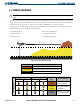
Obstacles are shown on the Terrain Page at or below the Map Range of 10 nm.
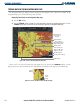
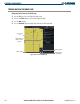
Enable/Disable Aviation Data
The Terrain Page can be shown with or without Aviation Data.
1) While the Terrain Proximity Page is displayed, press the
MENU
key.
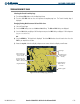
2) Turn the small
FMS
knob to select “Show (or Hide) Aviation Data”.
3) Press the
ENT
key.
Figure 6-46 Terrain Page Menu