
User Guide



Garmin G1000 Pilot’s Guide for the Diamond DA42
190-00649-00 Rev. A6-36
HAZARD AVOIDANCE
BENDIX/KING KTA 870 TEST MODE
NOTE:
A pilot-initiated test can be performed only when the system is in Standby or Failed Mode.
To perform a pilot-initiated test:
1) Selected the Traffic Map Page.
2) Press the TEST Softkey or the MENU key to select the ‘Test Mode’.
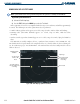
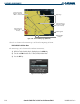
A TAS equipment self-test is best accomplished with the range set to 2 and 6 nm, and will last approximately
8 seconds. The following occurs when a pilot-initiated test is performed:
• A Traffic Advisory (yellow circle) appears at 9 o’clock, range of 2 miles, 200 feet below and climbing.
• Proximity traffic (solid white diamond) appears at 1 o’clock, range 3.6 miles, 1000 feet below,
descending.
• Non-threat traffic (open white diamond) appears at 11 o’clock, range of 3.6 miles, flying level 1000 feet
above.
If the KTA 870 successfully completes self-test, a synthesized voice announces: “TAS SYSTEM OK”. The
unit should switch to Operate Mode at the completion of the test. Should a failure be detected during self-
test, the audio message says: “TAS SYSTEM FAIL”. The unit should revert back to Standby Mode if a self-test
failure is detected.
Figure 6-40 Traffic Map Page (KTA 870 Test Mode)
Test Non-Threat
Traffic is 100’
Above
Own Aircraft
Test Proximity Traffic
is 100’ Below &
Descending
Test Traffic Advisory,
Aircraft is 200’ Below
& Climbing
Map Range
Operating Mode
Indicator