
User Guide



190-00649-00 Rev. A
Garmin G1000 Pilot’s Guide for the Diamond DA42
6-35
HAZARD AVOIDANCE
The unit must be in Operating Mode for traffic to be displayed. Operating Modes can be selected by
pressing the following softkeys:
OPERATE – The unit must be in Operating Mode to display traffic
STANDBY – The ability to switch out of standby into Operating Mode on the ground is especially useful for
scanning airspace around the airport before takeoff
ALT MODE – The Altitude Display Mode can be changed to show traffic in the selected range; the following
softkeys appear when this softkey is selected:
BELOW
NORMAL
ABOVE
UNREST
With each selection, the screen changes to display the traffic detected within the selected altitude display
range. The G1000 screen also displays unrestricted traffic (UNREST) having a range of maximum specified by
the applicable TAS Pilot’s Guide. Refer to the applicable TAS Pilot’s Guide for information regarding altitude
display ranges. Note that confirmation is not required. The mode is changed immediately when selected.
The display range on the Traffic Map Page can be changed at any time.
To change the display range on the Traffic Page, turn the
RNG Knob to zoom through the following range
options:
2 nm, 2 and 6 nm, 6 and 12 nm, 12 and 24 nm, and 24 and 40 nm.
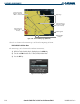
Figure 6-39 Traffic Map Page (TAS), Altitude Selection
BELOW, NORMAL,
ABOVE , and
UNREST Softkeys
Proximity Traffic at
Same Altitude &
Climbing
Operating Mode
and Altitude Display
Mode Indicator