
User Guide




Garmin G1000 Pilot’s Guide for the Diamond DA42
190-00649-00 Rev. A6-28
HAZARD AVOIDANCE
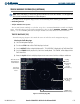
Configuring traffic on the Navigation Map Page:
1) Select the Navigation Map Page.
2) Press the
MENU
Key to display the Navigation Map Page
Menu
. The cursor flashes on the ‘Map Setup’
Option.
3) Turn the small FMS Knob to select ‘Map Setup’ and press the ENT Key.
3) The flashing cursor highlights the ‘GROUP’ field. Turn the small FMS Knob to select ‘Traffic’ and press the ENT
Key.
4) Turn the large FMS Knob to select the desired Traffic Mode Option.
5) Turn the small FMS Knob to select the desired option and press the ENT Key. Repeat the step for Traffic Symbol
and Traffic Label.
6) Return to the Navigation Map Page by pressing the FMS Knob or pressing and holding the CLR Key.
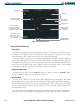
Figure 6-36 Map Page Setup,
Traffic Options
Traffic Mode allows the pilot to choose how traffic is displayed (all traffic, traffic and proximity advisories, or
traffic advisories only and the maximum range the traffic symbol and traffic label are displayed).