
User Guide




Garmin G1000 Pilot’s Guide for the Diamond DA42
190-00649-00 Rev. A6-26
HAZARD AVOIDANCE
When the G1000 is configured for TAS, the system receives only TAS traffic. Otherwise, if TAS is not configured,
the system provides TIS traffic data.
Traffic information can be displayed on the following by pressing the
MAP Softkey, followed by the TRAFFIC
Softkey:
• Navigation Map Page
• Traffic Map Page
• PFD Inset Map
• WPT VOR Information Page
• Trip Planning Page
• NRST Pages
• Active Flight Plan Pages
• VNAV Flight Plan Pages
TRAFFIC ANNUNCIATION
NOTE: If a second TA appears or if the number of TAs displayed decrease then increase, new aural and visual
alerts are generated.
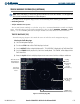
The G1000 System displays traffic on the Inset Map (PFD) and the Navigation Map Page (MFD). When a
traffic advisory (TA) is detected, the following automatically occurs:
• The Inset Map pops up and displays traffic
• A single “TRAFFIC” aural alert is generated
• A flashing black-on-yellow ‘TRAFFIC’ annunciation appears to the top left of the Attitude Indicator for five
seconds. The annunciation then remains on the display until no TAs are detected in the area
Figure 6-33 Traffic Annunciation
Whenever TIS service becomes unavailable “Traffic Not Available” will be heard
The G1000 traffic voice alerts sound only when TIS is configured. When TAS is configured, the TAS equipment
provides audio alerts.