
User Guide


Garmin G1000 Pilot’s Guide for the Diamond DA42
190-00649-00 Rev. A6-14
HAZARD AVOIDANCE
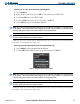
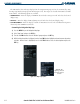
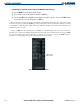
Customizing the display of weather data on the Weather Data Link Page:
1) Press the
MENU
Key on the Weather Data Link Page.
2) Select ‘Weather Setup’ on the Page Menu and press the
ENT
Key.
3) Turn the large
FMS
Knob to highlight and move between the product selections. Turn the small
FMS
Knob to
select an option for each selection and press the
ENT
Key.
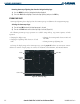
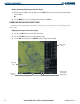
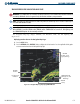
Map panning moves the map beyond its current limits without adjusting the map range. When the panning
function is selected by pushing the
Joystick
, a panning arrow flashes on the Weather Data Link Page. Panning
over AIRMETs, County Warnings, TFRs, Echo Tops, METARs, SIGMETs, and Cell Movement displays text
information for the selection.
Pressing the
ENT Key when panning over an AIRMET or a SIGMET displays the actual text of that alert.
Panning over an airport with METAR information does not display more information but pressing the ENT
Key and selecting that Airport’s Information Page displays the actual text. Pressing the ENT Key when
panning over a TFR displays TFR specific information for the panned TFR.
Figure 6-16 Data Link Page Setup Menu
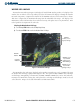
Winds Aloft
Data Selected