
User Guide




190-00649-00 Rev. A
Garmin G1000 Pilot’s Guide for the Diamond DA42
1-18
SYSTEM OVERVIEW
MFD SOFTKEYS
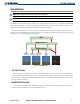
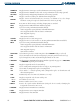
MFD softkeys vary depending on the page selected. EIS and Navigation Map Page (default MFD page)
softkeys are described here.
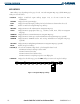
• ENGINE
Displays second-level engine softkeys (Figure 1-19; see the EIS Section for more
information)
SYSTEM
Displays the EIS System Display
FUEL
Displays the EIS Fuel Display (softkeys for fuel calculations are shown when selected)
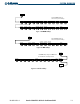
• MAP
Enables second-level Navigation Map Page softkeys
TRAFFIC
Displays/removes traffic information on Navigation Map Page
TOPO
Displays/removes topographical data (e.g., coastlines, terrain, rivers, lakes) on Navigation
Map Page
TERRAIN
Displays/removes terrain information on Navigation Map Page
STRMSCP
Displays/removes Stormscope weather information on Navigation Map Page (
optional)
NEXRAD
Displays/removes NEXRAD weather and coverage information on Navigation Map Page
(optional)
XM LTNG
Displays/removes XM lightning information on Navigation Map Page (optional)
BACK
Returns to top-level softkeys
• DCLTR (3)
Selects desired amount of map detail; cycles through declutter levels:
DCLTR (No Declutter): All map features visible
DCLTR-1: Removes land data
DCLTR-2: Removes land and SUA data
DCLTR-3: Removes everything except the active flight plan
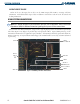
• CHKLIST Displays the Checklist Page; press the EXIT Softkey to return to the top-level softkeys
Figure 1-18 Navigation Map Page Softkeys
Press the BACK softkey to
return to the top-level softkeys.
ENGINE
FUEL
ENGINE
SYSTEM
INC FUEL
RST FUEL
DEC FUEL
BACK
FUEL
ENGINE
SYSTEM
BACK
BACK
(optional)
NEXRAD
TERRAIN
(optional)
XM LTNG
STRMSCP
(optional)
TOPO
MAP
TRAFFIC
Press the BACK softkey to
return to the top-level softkeys.
CHKLIST
MAP
DCLTR
DCLTR-2
DCLTR-3
DCLTR-1
ENGINE
CHKLIST
The DONE softkey changes to UNDO when
the checklist item is already checked.
EXIT
DONE
ENGINE
CHKLIST
EMERGCY
CHKLIST