
User Guide


190-00649-00 Rev. A
Garmin G1000 Pilot’s Guide for the Diamond DA42
6-13
HAZARD AVOIDANCE
WEATHER DATA LINK PAGE
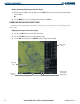
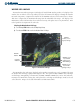
The Weather Data Link Page (Figure 6-15) displays all available XM weather products. The display of the
weather data can either be selected by softkeys located at the bottom of the display or through the Weather
Data Link Setup Menu. Composite data from all of the NEXRAD radar sites in the United States is shown.
This data is composed of the maximum reflectivity from the individual radar sweeps. The display of the
information is color-coded to indicate the weather level severity. The update rate is every five minutes. Refer
to the legend for a description of the color code.
Selecting the Weather Data Link Page:
1) Turn the large
FMS
Knob to select the Map Page Group.
2) Turn the small
FMS
Knob to select the Weather Data Link Page.
Figure 6-15 Weather Data Link Page
NEXRAD, Cloud
Tops and XM
Lightning Softkeys
NEXRAD
Weather
NEXRAD
Products, Storm
Legend, and Age
NEXRAD, Cloud
Tops and XM
Lightning Icons,
1000 NM Range
Lightning
Indication
The XM Weather data and ranges displayed on the Weather Data Link Page can be customized by using
the Weather Data Link Page Options Menu (Figure 6-16). The options include NEXRAD data, Echo Tops
or Cloud Tops, XM Lightning, Cell Movement, SIGMETs, AIRMETs, METAR data, Surface Data and Time,
Freezing Level, Winds Aloft, County data, and Cyclone data. Echo Tops and Cloud Tops cannot be selected
at the same time. Ranges are selectable from 500 feet to 2000 nautical miles.