
User Guide


Garmin G1000 Pilot’s Guide for the Diamond DA42
190-00649-00 Rev. A6-12
HAZARD AVOIDANCE
The XM Weather data and ranges displayed on the Navigation Map Page and can be customized by using
the Map Setup Weather Group Options Menu (Figure 6-14). The ranges are selectable from 500 feet to 2000
nautical miles. The following options are available:
•
NEXRAD DATA
– Turns the display of NEXRAD data and radar coverage on or off and selects the desired
display range.
•
XM LTNG
– Turns the display of XM Lightning on or off and selects the desired display range.
•
CELL MOVEMENT
– Turns the display of storm cell movement on or off. The Cell Movement Option is
shown only when NEXRAD is turned on.
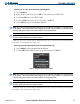
Customizing the Navigation Map Page:
1) Press the
MENU
Key on the Navigation Map Page.
2) Select ‘Map Setup’ and press the
ENT
Key.
3) Turn the small
FMS
Knob to select the ‘Weather’ group and press the
ENT
Key.
4) While the Map Setup Menu is displayed, turn the large
FMS
Knob to highlight and move between the product
selections. When an item is highlighted, turn the small
FMS
Knob to select the desired option and press the
ENT
Key.
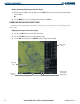
NEXRAD, XM
Lightning, and Cell
Movement Options
Selected
Figure 6-14 Map Setup Options