
User Guide


Garmin G1000 Pilot’s Guide for the Diamond DA42
190-00649-00 Rev. A6-10
HAZARD AVOIDANCE
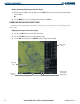
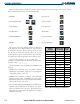
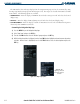
When a weather product is active, the product symbol is displayed in the lower right of the screen. Cloud
Top and Echo Top may not be selected simultaneously.
• NEXRAD
• Cloud Top/Echo Top
• XM Lightning
• Cell Movement
• SIGMETs/AIRMETs
• METARs
• City Forecast
• Surface Analysis
• Freezing Levels
• Winds Aloft
• County Warnings
• Cyclone Warnings
The age for each of the enabled products are displayed
on the right side of the display (Table 6-2). Ages are based
on Zulu times when the data was processed, not the time
the data was received in the aircraft. When the age of a
weather product is greater than half of the expiration time,
the product time will change from cyan to amber in color.
Current weather products use an age stamp, ‘Age, _ _ _’
in minutes. Reported (forecasted) weather products use a
date/time stamp; ‘_ _/_ _ /_ _:_ _’.
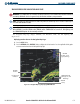
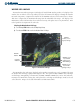
Certain limitations exist regarding the NEXRAD radar
displays:
• NEXRAD base reflectivity does not provide sufficient
information to determine cloud layers or precipitation
characteristics (hail vs. rain, etc.).
• NEXRAD base reflectivity is sampled at the minimum
antenna elevation angle. A NEXRAD site cannot depict
high altitude storms at close ranges and has no information
about storms directly over the site.
• The resolution of displayed NEXRAD data is 2 kilometers.
Therefore, when zoomed in on the display, each square
block is 2 kilometers on each side. The intensity level
reflected by the square will be the highest level sampled
within the square area.
Weather
Product
Expires After
“n” minutes
Update
Rate
SIGMETs/AIRMETs 60 12 Min
City Forecasts
60 12 Min
County Warnings
60 5 Min
Cyclone Warnings
60 12 Min
Echo Tops
30 7.5 Min
Freezing Levels
60 12 Min
METARs
90 12 Min
Lightning 30 5 Min
NEXRAD 30 5 Min
Radar Coverage
30 5 Min
Cell Movement 30 1.25 Min
Surface Analysis
60 12 Min
TFRs 60 12 Min
Winds Aloft
90 12 Min
TAFs
60 12 Min
Clouds Tops
60 15 Min
Table 6-2 Weather Product Age and Update Rate