
User Guide




5-126 190-00649-00 Rev. A
Garmin G1000 Pilot’s Guide for the Diamond DA42
GPS NAVIGATION
TRAFFIC GROUP
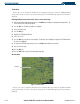
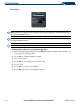
Figure 5-86 Traffic Group
NOTE: If the G1000 is configured to use an optional Traffic Advisory System (TAS), Traffic Information Service
(TIS) will not be available for use.
NOTE: Traffic Information Service (TIS) is only available when the aircraft is within the service volume of a
TIS-capable terminal radar site.
NOTE: Refer to the Hazard Awareness Section for detailed information regarding the display of traffic.
Enabling/disabling traffic data on the Navigation Map Page:
1) With the Navigation Map Page displayed, press the
MENU
Key to display the Navigation Map Page
Menu
. The
cursor flashes on the ‘Map Setup’ option.
2) Press the
ENT
Key. The Map Setup Menu is displayed
3) Select the ‘Traffic’ group.
4) Press the
ENT
Key. The cursor flashes on the ‘TRAFFIC’ field.
5) Select ‘On’ or ‘Off’.
6) Press the
ENT
Key to accept the selected option.
7) Press the
FMS
Knob
to return to the Navigation Map Page.